Expense Tracker.
A clean personal-finance app with budgets and analytics.
The project
& the challenge.
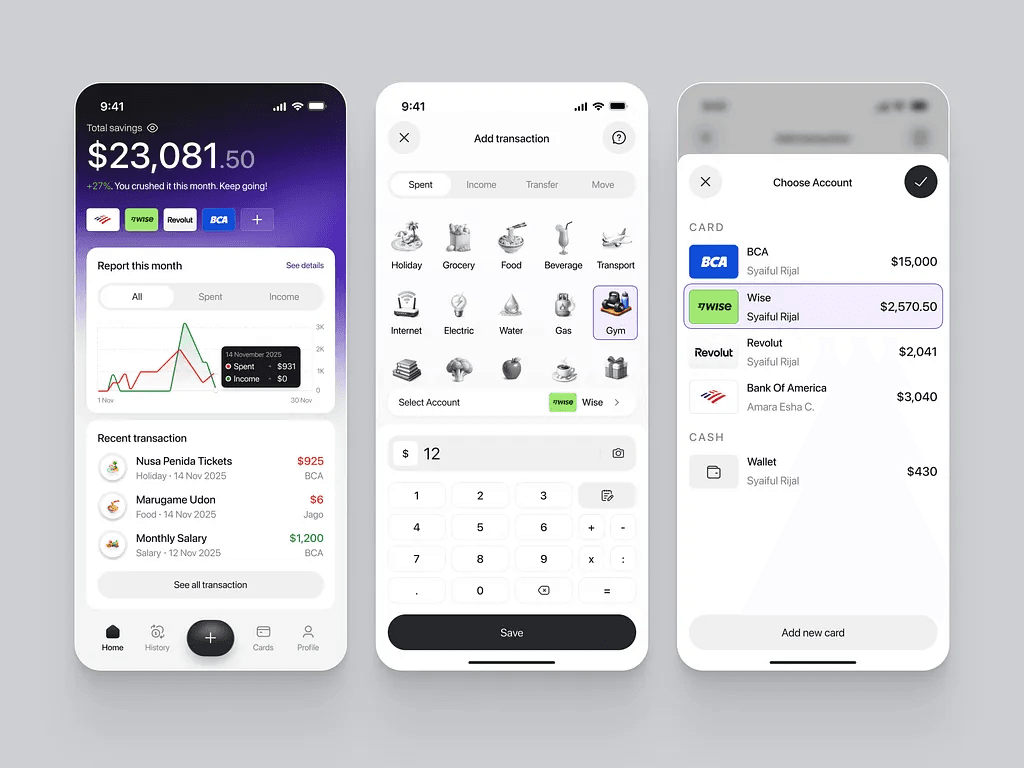
Expense Tracker is a personal finance app for people who want a quick, friction-free way to see where their money goes. Add a transaction in two taps; get budget alerts and monthly insights without leaving the home screen.
Most expense apps either bury the 'add transaction' flow under three menus or bloat the UI with bank-syncing setup that rural users can't complete. The goal was the opposite: a fast manual-entry app that makes daily tracking effortless.
How I built it.
Step-by-step decisions and trade-offs that shaped the final shipped product.
- 01
Designed a one-thumb add-transaction flow as the home screen, so logging an expense takes under 3 seconds.
- 02
Built category-based budgets with rolling monthly windows and gentle nudges when spending trends near the cap.
- 03
Implemented analytics views — by category, by week, by month — using lightweight in-app charts to avoid heavy chart libraries.
- 04
Stored data locally with cloud sync so the app works offline and stays fast on first launch.
- 05
Used Node.js + MongoDB on the backend for sync, auth, and multi-device consistency.
What it does.
2-tap entry
Add a transaction faster than typing it in notes — that's the whole point.
Budgets & alerts
Set monthly category budgets; get nudged before you blow them.
Analytics
Spend trends by category, week, and month — at a glance.
Offline-first
Add and view anywhere; cloud-sync when online.
Multi-device
Same data on phone, tablet, and the web companion.
Custom categories
Create your own categories with icons and colors.